Train ECG Denosier
This example displays saved outputs. Building the documentation does not run training. Check dataset paths for your notebook working directory before running.
Date created: 2024/08/13
Last Modified: 2024/07/17
Description: Train, evaluate, and export ECG denoiser model from scratch
Overview
Section titled “Overview”In this guide, we will train an ECG denoiser to remove noise and artifacts from raw ECG signals. Once trained, we demonstrate how to evaluate the model and export it for inference for both TF Lite and TF Lite for Micro.
Input
- Sensor: ECG
- Location: Wrist
- Sampling Rate: 100 Hz
- Frame Size: 2.56 seconds
Datasets
- Synthetic: Synthetic ECG signals from physioKIT
- PTB-XL: The PTB-XL is a large publicly available electrocardiography dataset. It contains 21837 clinical 12-lead ECGs from 18885 patients of 10 second length. The ECGs are sampled at 500 Hz and are annotated by up to two cardiologists.
!pip install -q --disable-pip-version-check heartkitimport os
os.environ["TF_CPP_MIN_LOG_LEVEL"] = "3"import contextlibfrom pathlib import Pathimport tempfileimport kerasimport heartkit as hkimport numpy as npimport helia_edge as heliaimport matplotlib.pyplot as plt# Be sure to set the dataset path to the correct locationdatasets_dir = Path(os.getenv("HK_DATASET_PATH", "./datasets"))
plot_theme = hk.utils.dark_themehelia.utils.silence_tensorflow()hk.utils.setup_plotting(plot_theme)logger = helia.utils.setup_logger(__name__)Create preprocess/augmentation pipeline
Section titled “Create preprocess/augmentation pipeline”Since our goal is to denoise ECG signals, we need to create an augmentation pipeline to generate noisy samples.
We will leverage helia-edge preprocessing layers to create the following augmentations:
- Baseline wander: Simulate baseline wander by adding a low frequency sine signal
- Powerline noise: Simulate powerline noise by adding a 50 Hz sinusoidal signal
- Amplitude warp: Simulate amplitude warp by randomly scaling along a low frequency sine wave
- Gaussian noise: Simulate lead noise by adding random noise following a Gaussian distribution
- Background noise: Add real noise captured from NSTDB dataset
preprocesses = [hk.NamedParams(name="layer_norm", params=dict(epsilon=0.01))]
augmentations = [    hk.NamedParams(        name="random_noise_distortion", params=dict(amplitude=[0.1, 1.5], frequency=[0.5, 1.5], name="baseline_wander")    ),    hk.NamedParams(        name="random_sine_wave",        params=dict(amplitude=[0, 0.05], frequency=[45, 50], auto_vectorize=False, name="powerline_noise"),    ),    hk.NamedParams(        name="amplitude_warp", params=dict(amplitude=[0.9, 1.1], frequency=[0.5, 1.5], name="amplitude_warp")    ),    hk.NamedParams(name="random_noise", params=dict(factor=[0.1, 0.5], name="random_noise")),    hk.NamedParams(name="random_background_noise", params=dict(amplitude=[0.1, 0.5], num_noises=2, name="nstdb")),]
Define TCN model architecture
Section titled “Define TCN model architecture”For this task, we are going to leverage a customized TCN model architecture that is smaller and can handle 1D signals. The model consists of 5 TCN blocks with a depth of 1. Each block leverages dilated depthwise-separable convolutions along with inverted expansion and squeeze and excitation layers. The model is followed by a 1D convolutional layer.
mbconv_blocks = [    dict(        depth=1, branch=1, filters=16, kernel=(1, 7), dilation=(1, 1), dropout=0, ex_ratio=1, se_ratio=0, norm="batch"    ),    dict(        depth=1, branch=1, filters=24, kernel=(1, 7), dilation=(1, 1), dropout=0, ex_ratio=1, se_ratio=2, norm="batch"    ),    dict(        depth=1, branch=1, filters=32, kernel=(1, 7), dilation=(1, 2), dropout=0, ex_ratio=1, se_ratio=2, norm="batch"    ),    dict(        depth=1, branch=1, filters=40, kernel=(1, 7), dilation=(1, 4), dropout=0, ex_ratio=1, se_ratio=2, norm="batch"    ),    dict(        depth=1, branch=1, filters=48, kernel=(1, 7), dilation=(1, 8), dropout=0, ex_ratio=1, se_ratio=2, norm="batch"    ),]
architecture = dict(    name="tcn",    params=dict(        input_kernel=(1, 7),        input_norm="batch",        blocks=mbconv_blocks,        output_kernel=(1, 7),        include_top=True,        use_logits=True,        model_name="tcn",    ),)
Configure datasets
Section titled “Configure datasets”Capturing noise-free ECG signals is challenging due to the presence of various artifacts. Therefore, we use a combination of synthetic and controlled, real-world datasets as our training data. heartKIT exposes an ECG Synthetic dataset generator provided by physioKIT.
datasets = [ hk.NamedParams( name="ecg-synthetic", params=dict( num_pts=5000, params=dict( presets=["SR", "AFIB", "ant_STEMI", "LAHB", "LPHB", "high_take_off", "LBBB", "random_morphology"], preset_weights=[24, 8, 1, 1, 1, 1, 1, 0], duration=10, sample_rate=100, heart_rate=[40, 160], impedance=[1, 2], p_multiplier=[0.7, 1.3], t_multiplier=[0.7, 1.3], noise_multiplier=[0, 0.01], voltage_factor=[800, 1000], ), ), ), hk.NamedParams( name="ptbxl", params=dict( path=datasets_dir / "ptbxl", ), ),]Task configuration
Section titled “Task configuration”Here we provide the constants that we will use throughout the guide. For better performance, adjust parameters as needed such as BATCH_SIZE, EPOCHS, and LEARNING_RATE.
params = hk.HKTaskParams( # Common arguments name="hk-ecg-denoiser", job_dir=Path(tempfile.gettempdir()) / "hk-ecg-denoiser", # Dataset arguments datasets=datasets, # Signal arguments sampling_rate=100, frame_size=256, # Dataloader arguments samples_per_patient=5, val_samples_per_patient=10, test_samples_per_patient=10, # Preprocessing/Augmentation arguments preprocesses=preprocesses, augmentations=augmentations, # Class arguments num_classes=1, class_map={0: 0}, class_names=["DENOISE"], # Split arguments val_patients=0.1, val_size=10000, test_size=10000, val_file="val.pkl", test_file="val.pkl", # Model arguments model_file="model.keras", architecture=architecture, # Training parameters lr_rate=1e-3, lr_cycles=1, batch_size=256, buffer_size=25000, epochs=100, steps_per_epoch=50, val_metric="loss", class_weights="balanced", # Evaluation arguments threshold=0.5, val_metric_threshold=0.98, # Export parameters tflm_var_name="ecg_denoise_flatbuffer", tflm_file="ecg_denoise_flatbuffer.h", # Demo params backend="pc", demo_size=800, display_report=True, # Extra arguments verbose=1, seed=42,)Load denoise task
Section titled “Load denoise task”heartKIT provides a TaskFactory that includes a number ready-to-use tasks. Each task provides methods for training, evaluating, exporting, and demoing. We will grab the denoise task and configure it for our use case.
task = hk.TaskFactory.get("denoise")Download the datasets
Section titled “Download the datasets”We will download the synthetic and PTB-XL datasets using heartkit. If already downloaded, this step will be skipped.
task.download(params=params)Visualize the data
Section titled “Visualize the data”Let’s visualize a sample ECG signal from the synthetic dataset. Note this contains no noise or artifacts. Augmentations will be applied later to generate noisy samples for training.
ds = hk.DatasetFactory.get(params.datasets[0].name)(cacheable=False, **params.datasets[0].params)
ds_gen = ds.signal_generator(    patient_generator=helia.utils.uniform_id_generator(ds.get_test_patient_ids()),    frame_size=params.frame_size,    samples_per_patient=params.samples_per_patient,    target_rate=params.sampling_rate,)ecg = next(ds_gen)
ts = np.arange(0, len(ecg)) / params.sampling_ratefig, ax = plt.subplots(1, 1, figsize=(9, 4))ax.plot(ts, ecg, color=plot_theme.primary_color, lw=3)fig.suptitle("Raw ECG Signal")ax.set_xlabel("Time (s)")ax.set_ylabel("Amplitude")fig.tight_layout()fig.show()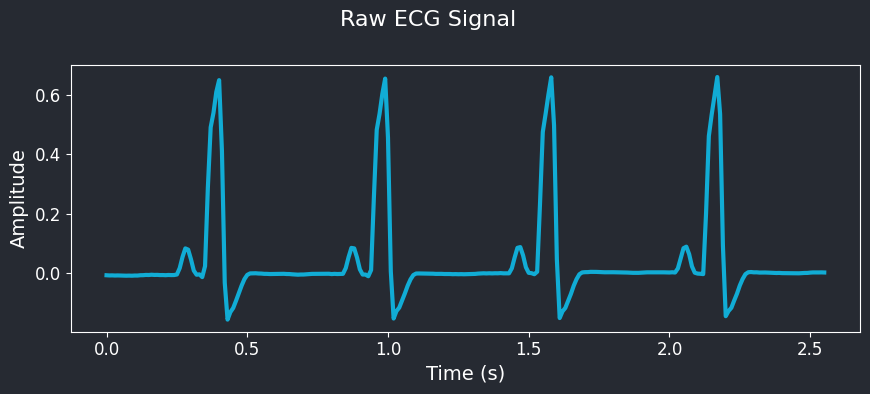
Visualize augmented data
Section titled “Visualize augmented data”Let’s visualize the augmented data to understand how the augmentations affect the ECG signals.
preprocessor = hk.datasets.create_augmentation_pipeline(    augmentations=params.preprocesses,    sampling_rate=params.sampling_rate,)
augmenter = hk.datasets.create_augmentation_pipeline(    augmentations=params.augmentations,    sampling_rate=params.sampling_rate,)
WARNING: All log messages before absl::InitializeLog() is called are written to STDERRI0000 00:00:1723838156.202266 751181 cuda_executor.cc:1015] successful NUMA node read from SysFS had negative value (-1), but there must be at least one NUMA node, so returning NUMA node zero. See more at https://github.com/torvalds/linux/blob/v6.0/Documentation/ABI/testing/sysfs-bus-pci#L344-L355I0000 00:00:1723838156.222145 751181 cuda_executor.cc:1015] successful NUMA node read from SysFS had negative value (-1), but there must be at least one NUMA node, so returning NUMA node zero. See more at https://github.com/torvalds/linux/blob/v6.0/Documentation/ABI/testing/sysfs-bus-pci#L344-L355I0000 00:00:1723838156.222246 751181 cuda_executor.cc:1015] successful NUMA node read from SysFS had negative value (-1), but there must be at least one NUMA node, so returning NUMA node zero. See more at https://github.com/torvalds/linux/blob/v6.0/Documentation/ABI/testing/sysfs-bus-pci#L344-L355I0000 00:00:1723838156.223422 751181 cuda_executor.cc:1015] successful NUMA node read from SysFS had negative value (-1), but there must be at least one NUMA node, so returning NUMA node zero. See more at https://github.com/torvalds/linux/blob/v6.0/Documentation/ABI/testing/sysfs-bus-pci#L344-L355I0000 00:00:1723838156.223495 751181 cuda_executor.cc:1015] successful NUMA node read from SysFS had negative value (-1), but there must be at least one NUMA node, so returning NUMA node zero. See more at https://github.com/torvalds/linux/blob/v6.0/Documentation/ABI/testing/sysfs-bus-pci#L344-L355I0000 00:00:1723838156.223541 751181 cuda_executor.cc:1015] successful NUMA node read from SysFS had negative value (-1), but there must be at least one NUMA node, so returning NUMA node zero. See more at https://github.com/torvalds/linux/blob/v6.0/Documentation/ABI/testing/sysfs-bus-pci#L344-L355I0000 00:00:1723838156.268697 751181 cuda_executor.cc:1015] successful NUMA node read from SysFS had negative value (-1), but there must be at least one NUMA node, so returning NUMA node zero. See more at https://github.com/torvalds/linux/blob/v6.0/Documentation/ABI/testing/sysfs-bus-pci#L344-L355I0000 00:00:1723838156.268787 751181 cuda_executor.cc:1015] successful NUMA node read from SysFS had negative value (-1), but there must be at least one NUMA node, so returning NUMA node zero. See more at https://github.com/torvalds/linux/blob/v6.0/Documentation/ABI/testing/sysfs-bus-pci#L344-L355I0000 00:00:1723838156.268844 751181 cuda_executor.cc:1015] successful NUMA node read from SysFS had negative value (-1), but there must be at least one NUMA node, so returning NUMA node zero. See more at https://github.com/torvalds/linux/blob/v6.0/Documentation/ABI/testing/sysfs-bus-pci#L344-L355aug_ecg = augmenter(preprocessor(keras.ops.convert_to_tensor(np.reshape(ecg, (1, -1, 1)))), training=True)aug_ecg = aug_ecg.numpy().squeeze()
ts = np.arange(0, len(aug_ecg)) / params.sampling_ratefig, ax = plt.subplots(1, 1, figsize=(9, 4))plt.plot(ts, aug_ecg, color=plot_theme.primary_color, lw=3)fig.suptitle("Augmented ECG Signal")ax.set_xlabel("Time (s)")ax.set_ylabel("Amplitude")plt.tight_layout()plt.show()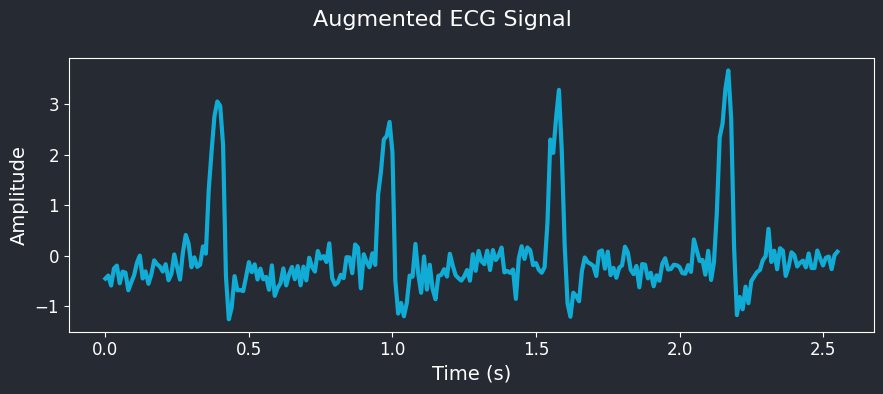
Visualize the model
Section titled “Visualize the model”Let’s view the first several layers of the model to understand the architecture better.
model = helia.models.tcn.tcn_from_object( x=keras.Input(shape=(params.frame_size, 1), name="inputs"), params=architecture["params"], num_classes=1)model.summary(layer_range=("inputs", model.layers[10].name))Model: "TCN"Saved output
┏━━━━━━━━━━━━━━━━━━━━━┳━━━━━━━━━━━━━━━━━━━┳━━━━━━━━━━━━┳━━━━━━━━━━━━━━━━━━━┓┃ Layer (type) ┃ Output Shape ┃ Param # ┃ Connected to ┃┡━━━━━━━━━━━━━━━━━━━━━╇━━━━━━━━━━━━━━━━━━━╇━━━━━━━━━━━━╇━━━━━━━━━━━━━━━━━━━┩│ inputs (InputLayer) │ (None, 256, 1) │ 0 │ - │├─────────────────────┼───────────────────┼────────────┼───────────────────┤│ reshape (Reshape) │ (None, 1, 256, 1) │ 0 │ inputs[0][0] │├─────────────────────┼───────────────────┼────────────┼───────────────────┤│ ENC.CN │ (None, 1, 256, 1) │ 7 │ reshape[0][0] ││ (DepthwiseConv2D) │ │ │ │├─────────────────────┼───────────────────┼────────────┼───────────────────┤│ ENC.BN │ (None, 1, 256, 1) │ 4 │ ENC.CN[0][0] ││ (BatchNormalizatio… │ │ │ │├─────────────────────┼───────────────────┼────────────┼───────────────────┤│ B1.D1.DW.B1.CN │ (None, 1, 256, 1) │ 7 │ ENC.BN[0][0] ││ (DepthwiseConv2D) │ │ │ │├─────────────────────┼───────────────────┼────────────┼───────────────────┤│ B1.D1.DW.B1.BN │ (None, 1, 256, 1) │ 4 │ B1.D1.DW.B1.CN[0… ││ (BatchNormalizatio… │ │ │ │├─────────────────────┼───────────────────┼────────────┼───────────────────┤│ B1.D1.DW.ACT │ (None, 1, 256, 1) │ 0 │ B1.D1.DW.B1.BN[0… ││ (Activation) │ │ │ │├─────────────────────┼───────────────────┼────────────┼───────────────────┤│ B1.D1.PW.B1.CN │ (None, 1, 256, │ 16 │ B1.D1.DW.ACT[0][… ││ (Conv2D) │ 16) │ │ │├─────────────────────┼───────────────────┼────────────┼───────────────────┤│ B1.D1.PW.B1.BN │ (None, 1, 256, │ 64 │ B1.D1.PW.B1.CN[0… ││ (BatchNormalizatio… │ 16) │ │ │├─────────────────────┼───────────────────┼────────────┼───────────────────┤│ B1.D1.PW.ACT │ (None, 1, 256, │ 0 │ B1.D1.PW.B1.BN[0… ││ (Activation) │ 16) │ │ │├─────────────────────┼───────────────────┼────────────┼───────────────────┤│ B2.D1.DW.B1.CN │ (None, 1, 256, │ 112 │ B1.D1.PW.ACT[0][… ││ (DepthwiseConv2D) │ 16) │ │ │└─────────────────────┴───────────────────┴────────────┴───────────────────┘ Total params: 10,223 (39.93 KB) Trainable params: 9,675 (37.79 KB) Non-trainable params: 548 (2.14 KB)Train the model
Section titled “Train the model”task.train(params)INFO Creating synthetic dataset cache with 5000 patients ecg_synthetic.py:159Building ecg-synthetic cache: 100%|██████████| 5000/5000 [00:57<00:00, 86.91it/s]INFO Validation steps per epoch: 39 datasets.py:85Training: 0%| 0/100 ETA: ?s, ?epochs/sWARNING: All log messages before absl::InitializeLog() is called are written to STDERRI0000 00:00:1723838225.604155 751478 service.cc:146] XLA service 0x7a52b8001f20 initialized for platform CUDA (this does not guarantee that XLA will be used). Devices:I0000 00:00:1723838225.604174 751478 service.cc:154] StreamExecutor device (0): NVIDIA GeForce RTX 4090, Compute Capability 8.9I0000 00:00:1723838232.858832 751478 device_compiler.h:188] Compiled cluster using XLA! This line is logged at most once for the lifetime of the process.Training: 100%|██████████ 100/100 ETA: 00:00s, 1.59s/epochs39/39 ━━━━━━━━━━━━━━━━━━━━ 0s 975us/step - cos: 0.7118 - loss: 0.0511 - mae: 0.1445 - mse: 0.0452 - snr: 11.9220INFO [VAL SET]COS=0.7079, LOSS=0.0528, MAE=0.1466, MSE=0.0469, SNR=11.9038 train.py:149Model evaluation
Section titled “Model evaluation”Now that we have trained the model, we will evaluate the model on the test dataset. Similar to training, we will provide the high-level configuration to the task process.
task.evaluate(params)INFO Creating synthetic dataset cache with 5000 patients ecg_synthetic.py:159Building ecg-synthetic cache: 100%|██████████| 5000/5000 [00:57<00:00, 87.16it/s]39/39 ━━━━━━━━━━━━━━━━━━━━ 2s 25ms/step - cos: 0.7238 - loss: 0.0443 - mae: 0.1328 - mse: 0.0384 - snr: 12.3671INFO [TEST SET] COS=0.7245, LOSS=0.0437, MAE=0.1316, MSE=0.0377, SNR=12.3787 evaluate.py:37Export model to TF Lite / TFLM
Section titled “Export model to TF Lite / TFLM”Once we have trained and evaluated the model, we need to export the model into a format that can be used for inference on the edge. Currently, we export the model to TensorFlow Lite flatbuffer format. This will also generate a C header file that can be used with TensorFlow Lite for Microcontrollers (TFLM).
For this model, we will export as a 32-bit floating point model.
NOTE: We utilize CONCRETE mode to lower the model to concrete functions before converting. This is because TF (MLIR) fails to properly lower the dilated convolutional layers.
quantization = hk.QuantizationParams( enabled=True, format="FP32", io_type="float32", conversion="CONCRETE",)params.quantization = quantization# TF dumps a lot of info to stdout, so we redirect it to /dev/nullwith open(os.devnull, "w") as devnull: with contextlib.redirect_stdout(devnull), contextlib.redirect_stderr(devnull): task.export(params)INFO Creating synthetic dataset cache with 5000 patients ecg_synthetic.py:159[08/16/24 20:02:23] WARNING WARNING:absl:Please consider providing the trackable_obj argument in the lite.py:2166 from_concrete_functions. Providing without the trackable_obj argument is deprecated and it will use the deprecated conversion path.INFO Validating model results export.py:83I0000 00:00:1723838543.688860 751181 cuda_executor.cc:1015] successful NUMA node read from SysFS had negative value (-1), but there must be at least one NUMA node, so returning NUMA node zero. See more at https://github.com/torvalds/linux/blob/v6.0/Documentation/ABI/testing/sysfs-bus-pci#L344-L355I0000 00:00:1723838543.688944 751181 devices.cc:67] Number of eligible GPUs (core count >= 8, compute capability >= 0.0): 1I0000 00:00:1723838543.689113 751181 cuda_executor.cc:1015] successful NUMA node read from SysFS had negative value (-1), but there must be at least one NUMA node, so returning NUMA node zero. See more at https://github.com/torvalds/linux/blob/v6.0/Documentation/ABI/testing/sysfs-bus-pci#L344-L355I0000 00:00:1723838543.689169 751181 cuda_executor.cc:1015] successful NUMA node read from SysFS had negative value (-1), but there must be at least one NUMA node, so returning NUMA node zero. See more at https://github.com/torvalds/linux/blob/v6.0/Documentation/ABI/testing/sysfs-bus-pci#L344-L355I0000 00:00:1723838543.689214 751181 cuda_executor.cc:1015] successful NUMA node read from SysFS had negative value (-1), but there must be at least one NUMA node, so returning NUMA node zero. See more at https://github.com/torvalds/linux/blob/v6.0/Documentation/ABI/testing/sysfs-bus-pci#L344-L355I0000 00:00:1723838543.689287 751181 cuda_executor.cc:1015] successful NUMA node read from SysFS had negative value (-1), but there must be at least one NUMA node, so returning NUMA node zero. See more at https://github.com/torvalds/linux/blob/v6.0/Documentation/ABI/testing/sysfs-bus-pci#L344-L355I0000 00:00:1723838543.689333 751181 cuda_executor.cc:1015] successful NUMA node read from SysFS had negative value (-1), but there must be at least one NUMA node, so returning NUMA node zero. See more at https://github.com/torvalds/linux/blob/v6.0/Documentation/ABI/testing/sysfs-bus-pci#L344-L355W0000 00:00:1723838543.815333 751181 tf_tfl_flatbuffer_helpers.cc:392] Ignored output_format.W0000 00:00:1723838543.815348 751181 tf_tfl_flatbuffer_helpers.cc:395] Ignored drop_control_dependency.INFO: Created TensorFlow Lite XNNPACK delegate for CPU.INFO [TF METRICS] LOSS=0.0396 MAE=0.1357 MSE=0.0396 RMSE=0.1991 COSINE=0.7178 export.py:90INFO [TFL METRICS] LOSS=0.0396 MAE=0.1357 MSE=0.0396 RMSE=0.1991 COSINE=0.7177 export.py:91INFO Validation passed (0.0000) export.py:99ECG Denoising Demo
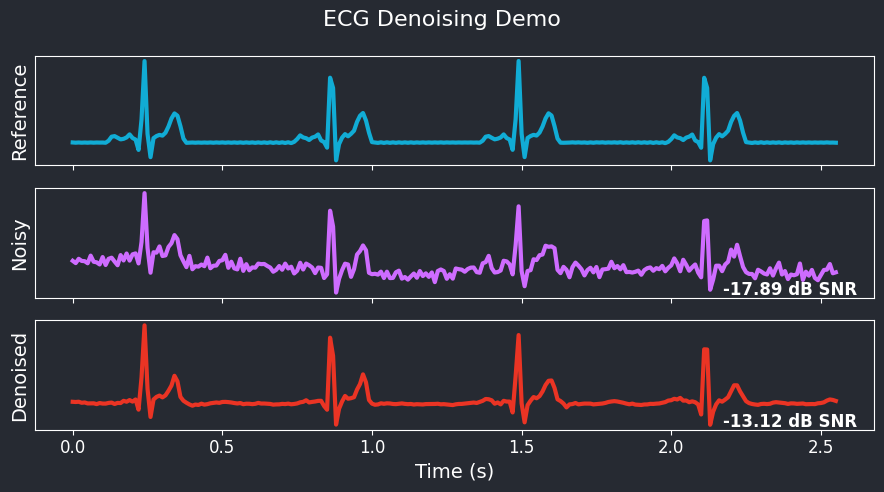
Section titled “ECG Denoising Demo”Finally, we will demonstrate how to use the trained ECG denoiser model to remove noise and artifacts from raw ECG signals. We will load a sample ECG signal, add noise to it, and then denoise it using the trained model. We will visualize the original, noisy, and denoised ECG signals to compare the results.
model = helia.models.load_model(params.model_file)ecg = next(ds_gen)aug_ecg = ( augmenter(preprocessor(keras.ops.convert_to_tensor(np.reshape(ecg, (1, -1, 1)))), training=True).numpy().squeeze())clean_ecg = model.predict(np.reshape(aug_ecg, (1, -1, 1)))snr = helia.metrics.Snr()snr.update_state(ecg.reshape(1, -1, 1), aug_ecg.reshape(1, -1, 1))aug_snr = snr.result().numpy()snr.reset_state()snr.update_state(ecg.reshape(1, -1, 1), clean_ecg.reshape(1, -1, 1))clean_snr = snr.result().numpy()1/1 ━━━━━━━━━━━━━━━━━━━━ 0s 9ms/stepfig, ax = plt.subplots(3, 1, figsize=(9, 5), sharex=True)ax[0].plot(ts, ecg.squeeze(), color=plot_theme.primary_color, lw=3)ax[1].plot(ts, aug_ecg.squeeze(), color=plot_theme.secondary_color, lw=3)ax[2].plot(ts, clean_ecg.squeeze(), color=plot_theme.tertiary_color, lw=3)
ax[0].set_ylabel("Reference")ax[1].set_ylabel("Noisy")ax[2].set_ylabel("Denoised")
ax[1].text(0.98, 0.15, f"{aug_snr:4.02f} dB SNR", transform=ax[1].transAxes, ha="right", va="top", weight="bold")ax[2].text(0.98, 0.15, f"{clean_snr:4.02f} dB SNR", transform=ax[2].transAxes, ha="right", va="top", weight="bold")# Disable y-axis ticks for all plotsfor axes in ax: axes.yaxis.set_ticks([])ax[-1].set_xlabel("Time (s)")fig.suptitle("ECG Denoising Demo")fig.tight_layout()fig.show()