Parse and visualize results
Share the published walkthrough with evaluators. It opens without GitHub repository access. GitHub source and release links require access while the repository is private; an unauthenticated GitHub 404 does not mean the documentation or release is missing.
Start with the bundle, then choose a table, a model graph or a timeline. This
walkthrough uses the public keyword-spotting (KWS) examples. Commands assume a
source checkout and its Python 3.12 or 3.13 environment; installed-wheel users can omit
uv run --frozen when invoking helx.
Read and verify a bundle
Section titled “Read and verify a bundle”uv run --frozen helx run -c examples/at110/kws_vela_only.yamluv run --frozen helx show results/kws_vela_onlyuv run --frozen helx validate bundle results/kws_vela_onlyrun_summary.md is the readable report. run_summary.json is the native
schema-version-4 contract. JSON measurements live under measurements.samples[i].
run_summary.csv contains one row per measured invocation, with dotted columns
such as measurement.index and measurement.cycles.total. Without measured
samples it retains one row of shared facts. Use helx export --fields statistics
for aggregate rows. manifest.json binds the retained files to their sizes and SHA-256
hashes. Keep the whole bundle when sharing evidence, including input_config.yaml
and artifacts/. The original source model can live outside the bundle.
Check fvp.stage, PMU sanity, platform revision, values status and metric basis
before quoting numbers. A valid Vela-only result has no executed FVP counters.
Energy, power and efficiency remain experimental estimates. Integrity verification
does not establish numerical accuracy or silicon qualification.
For automation, the verified offline reader checks completion, schema, paths and retained hashes before returning typed fields:
from pathlib import Pathfrom helia_estimator.api import load_result, measurement_samples
result = load_result(Path("results/kws_vela_only"))summary = result.summaryprint(summary.run.model, summary.fvp.stage)for sample in measurement_samples(result):    if sample.cycles is not None:        print("Measured sample", sample.index, "NPU total cycles:", sample.cycles.total)
for artifact in result.artifacts:    print(artifact.relative_path, artifact.sha256)
Run a saved script with uv run --frozen python your_script.py. Missing values
are unavailable, not zero. To read a retained file with another integrity check,
pass its ArtifactRef to result.read_artifact(artifact).
To list saved Model Explorer/Perfetto files with their experiment meaning, use
helx results artifacts results/kws_vela_only. The equivalent typed Python
catalog is viewer_artifacts(result). Use results export-artifact or
export_viewer_artifact to copy a retained visualization with another hash and
completion check; see the saved-visualization API.
See the Python API guide for rejected/incomplete bundles and
native exports, and the result reference for every field.
For JSON and aggregate CSV:
uv run --frozen helx show results/kws_vela_only --jsonuv run --frozen helx results inspect results/kws_vela_only --format jsonuv run --frozen helx export results/ --format csv --fields all > runs.csvshow --json emits native schema 4. results inspect/show/export use a separate,
draft portable mapping after native verification; that mapping is not a
released wire API. Ordinary helx export makes a table; --fields all selects
all native leaves rather than the default curated columns. Write derived files
outside the bundle so they do not invalidate its manifest. Use --strict
on table export when any rejected input should fail the export.
Explore the model in Google Model Explorer
Section titled “Explore the model in Google Model Explorer”Model Explorer shows a graph with HELX’s per-original-operation overlays. Install the optional viewer dependencies in the checkout:
uv sync --frozen --extra vizLoad the original, uncompiled .tflite used by this run. Overlay keys are
original output tensor names in graph main; the Vela-compiled or fenced model
will not give the same graph. Find the source in run_summary.json under
source.cached_path (or recover the exact original from source.given). A moved
bundle does not carry the model cache with it. The manifest verifies retained
artifacts, not an external cached source file.
For this example, copy the source into local/kws-original.tflite using a small
script saved as local/copy_viewer_model.py (create local/ first):
from pathlib import Pathfrom shutil import copyfilefrom helia_estimator.api import load_result
summary = load_result(Path("results/kws_vela_only")).summarysource = Path(summary.source.cached_path)copyfile(source, Path("local/kws-original.tflite"))uv run --frozen python local/copy_viewer_model.pyuv run --frozen --extra viz model-explorer local/kws-original.tflite --node_data_paths=results/kws_vela_only/artifacts/model_explorer_overlay_mac_count.jsonFollow the local URL printed by Model Explorer. Expand groups to inspect
operations; select MAC Count in the node data controls and use its eye icon
to color the graph. You can also start model-explorer without arguments,
select the original model, choose View selected models, then Add per-node
data to load an overlay JSON. These are Model Explorer data files, not
run_summary.json.
Overlay in artifacts/ |
Meaning |
|---|---|
model_explorer_overlay_mac_count.json |
Vela-attributed MAC count |
model_explorer_overlay_sram.json |
Vela-attributed SRAM accesses |
model_explorer_overlay_cycles.json |
Vela cycle attribution scaled to the full-model FVP cycle total |
In HELX 0.7.0, a Vela-only run’s Calibrated Cycles overlay contains zeros
because there is no FVP total to scale to. Use MAC Count or SRAM Accesses for that
run. To view calibrated cycles, use an executed FVP bundle, for example the
bus-trace run below, and select its cycles overlay with the same original model.
These are attributed cycles, not independent per-operation measurements.
Raw compiler estimates and attribution are also available in
per_layer_breakdown.csv and per_original_op_breakdown.csv.
For multi-subgraph models, or runs whose warmup excludes CALL_ONCE
initialization, HELX currently omits calibrated layer breakdowns and overlays
because Vela’s table may describe a different execution scope. The raw
vela_verbose_performance.log remains available; per_layer.unavailable_reason,
run_summary.md and helx show BUNDLE --layers 5 explain the omission.
Full-model PMU counters remain available. An overlay is also omitted when no
original operators can be mapped; consult the retained CSVs in that case.
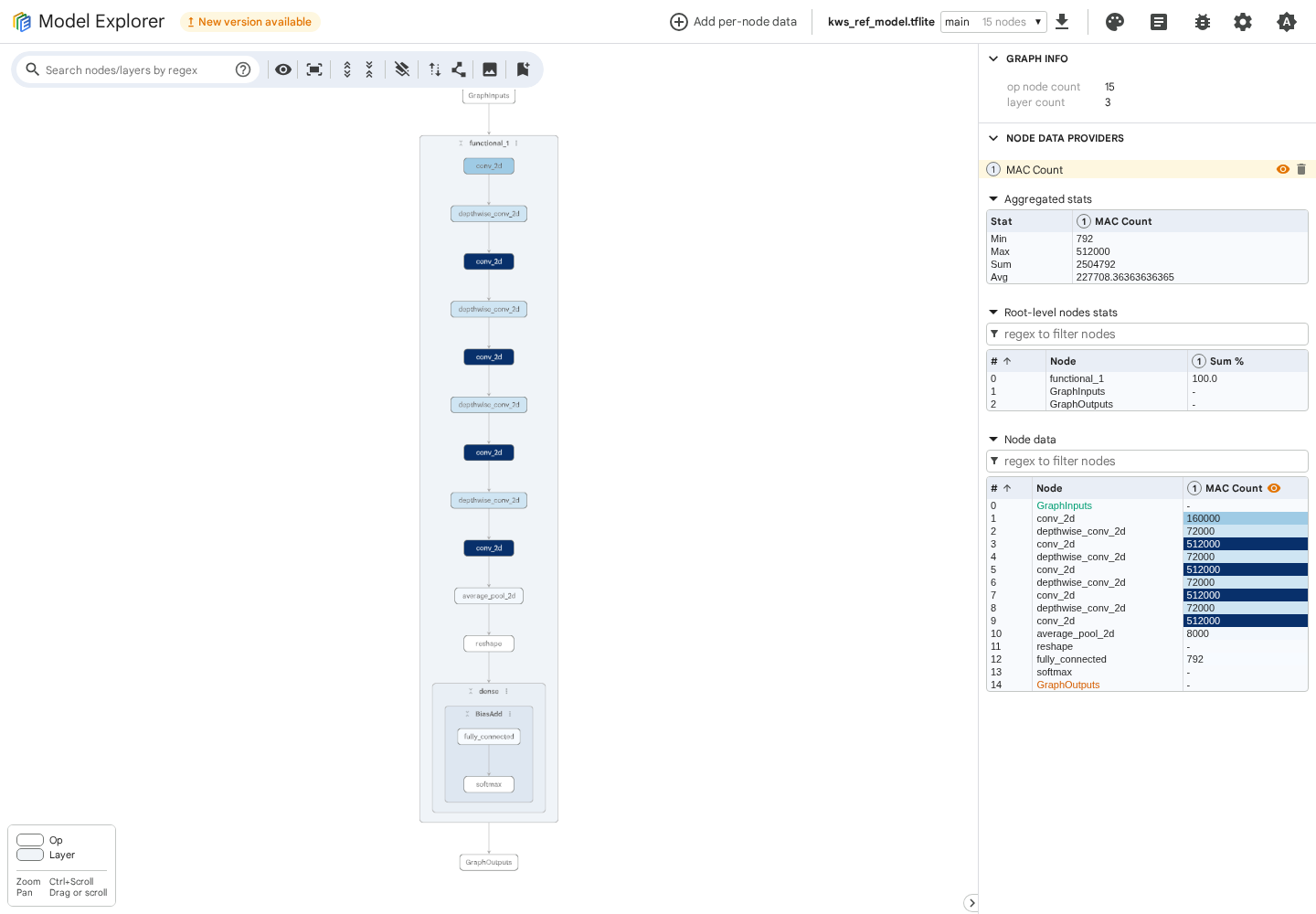
The screenshot uses the public KWS example’s compiler output. Graph grouping and
controls may vary with the viewer version. If the overlay does not color nodes,
check the selected data series, graph main and original model identity first.
The optional TFLite adapter is platform dependent; if unavailable on your host,
run the viewer in a supported Linux environment. HELX’s normal CLI does not
require Model Explorer. See Google’s user guide
and command-line guide.
Open a bus timeline in Google Perfetto
Section titled “Open a bus timeline in Google Perfetto”After the normal helx setup prerequisites and Arm licence acceptance, run:
uv run --frozen helx run -c examples/at110/kws_bus_trace.yamluv run --frozen helx validate bundle results/kws_bus_traceThe example enables defaults.fvp.bus_trace.enabled. Bus tracing requires the
Corstone-320 / Ethos-U85 target; it is unavailable on Corstone-300 / U55 / U65.
Open ui.perfetto.dev, choose Open trace file, and
select results/kws_bus_trace/artifacts/bus_trace_perfetto.json, or drag that
file into the page. Use the path recorded in
artifacts.bus_trace_perfetto_json for other bundles. No recording session or
browser extension is needed. Zoom with W/S, pan with A/D, and click a
track event to inspect its details.
Click Expand all in the track toolbar so SRAM0, SRAM1 and EXT are visible. Zoom into an active interval to inspect the three interfaces together. The screenshot below has the memory-interface group expanded.
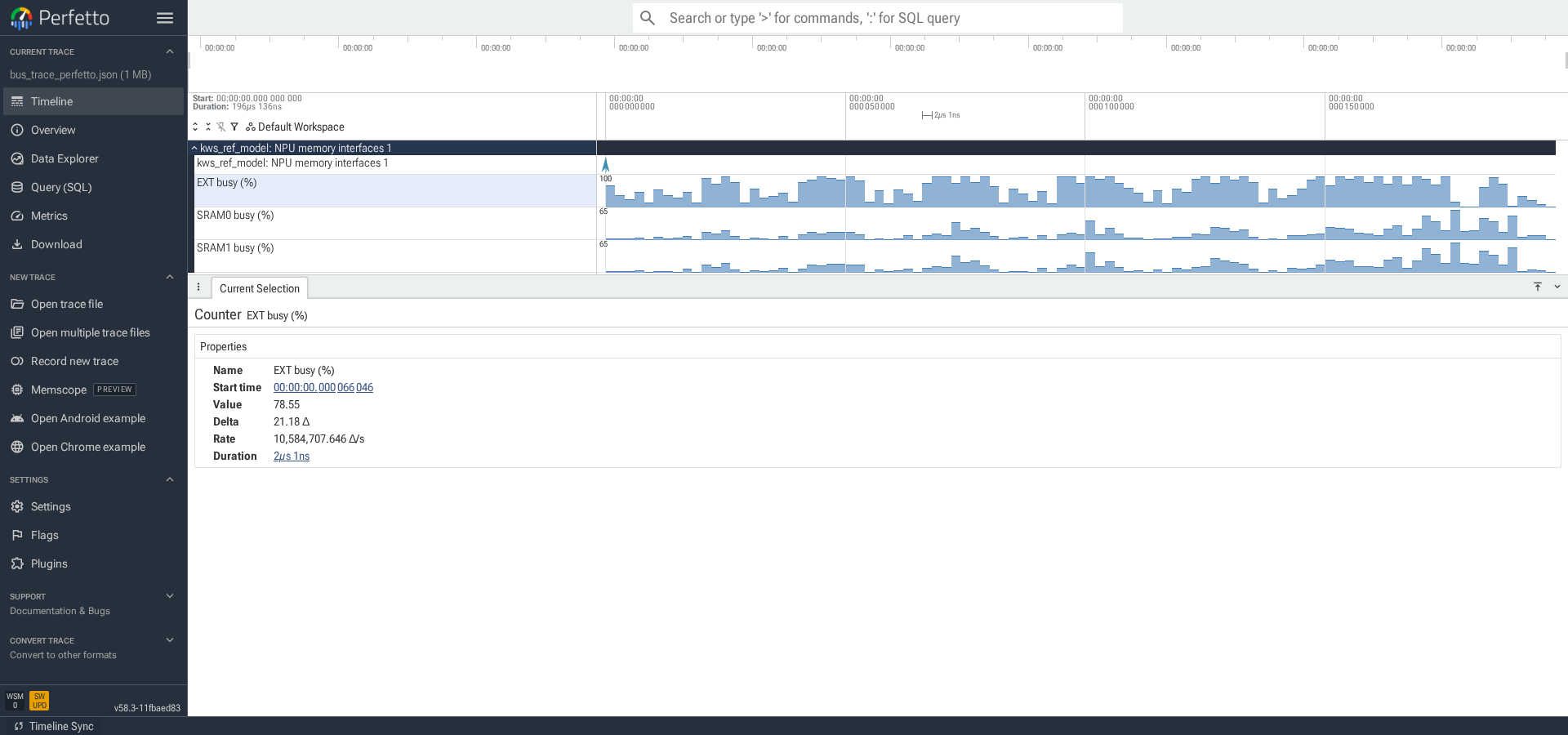
This view bins FVP bus transactions into a timeline normalized to NPU cycles.
It is a simulator diagnostic, not a silicon capture or a cycle-accurate CPU/bus
schedule. Keep fvp.bus_trace checks, time scaling and the configured NPU clock
with the interpretation. Companion bus_trace_timeline.csv and
bus_trace_transfers.csv support programmatic analysis. keep_raw: false
removes the raw transaction log after analysis, while retaining these outputs.
See Perfetto’s UI guide.
SRAM read and write diagnostics
Section titled “SRAM read and write diagnostics”The fenced Perfetto view focuses on PMU counters and verified bus traffic. Use these figures to decide what to inspect next:
| Figure | Meaning and useful follow-up |
|---|---|
| MAC active | MAC-active cycles / NPU-active cycles. Low activity warrants checking memory pressure and the operator; it is not a percentage of peak MAC throughput. |
| SRAM0 busy, SRAM1 busy, EXT busy | Read + write beats / beats allowed at the configured port rate. A busy interface can motivate a memory-placement or bandwidth experiment. Separate SRAM interfaces require a verified bus trace. |
| SRAM0 traffic share | SRAM0’s fraction of all SRAM read + write beats; 50% is even. Compare the two SRAM busy tracks before trying a port-balance change. No traffic means unknown. |
| Mean SRAM read/write transfer | Bytes / transfers, separately for each direction. Small transfers can motivate inspecting layout and burst splitting; a mean alone does not establish a cause. Requires a verified trace. |
| Reads/writes queued, outstanding limit | Counted request-stall events / NPU-active cycles. Use these with port usage to investigate queue pressure; events can overlap and ratios can exceed 100%. |
Uncounted metrics stay absent; a metric missing on some invocations has gaps
rather than a misleading zero. The selected profiles do not measure cache
hits/misses, so there is no reported hit rate. Vela cycle comparisons remain
available in fenced_layers.csv for compiler diagnosis and are omitted from
the timeline and selected-event details. Existing traces retain their original
tracks; rerun with the updated version to produce the new view.
For the separate SRAM usage, traffic-share and transfer-size figures, combine
defaults.fvp.bus_trace.enabled: true with per-operator fencing on U85, as
described in the methodology. The bus-only example above does not enable
per-operator fencing by itself. A PMU-only capture shows aggregate SRAM busy
when its counters suffice, assuming an even split across interfaces.
The expanded view below uses a BC-ResNet-8 proxy model with port_stall
counters and a verified bus trace. The top lanes show individual fenced NPU
invocations; the graphs below show their measured activity and derived traffic
figures. SRAM0/SRAM1 usage and traffic share include both reads and writes.
The read-only stall profile does not count write stalls; their absence is
unknown, rather than zero.
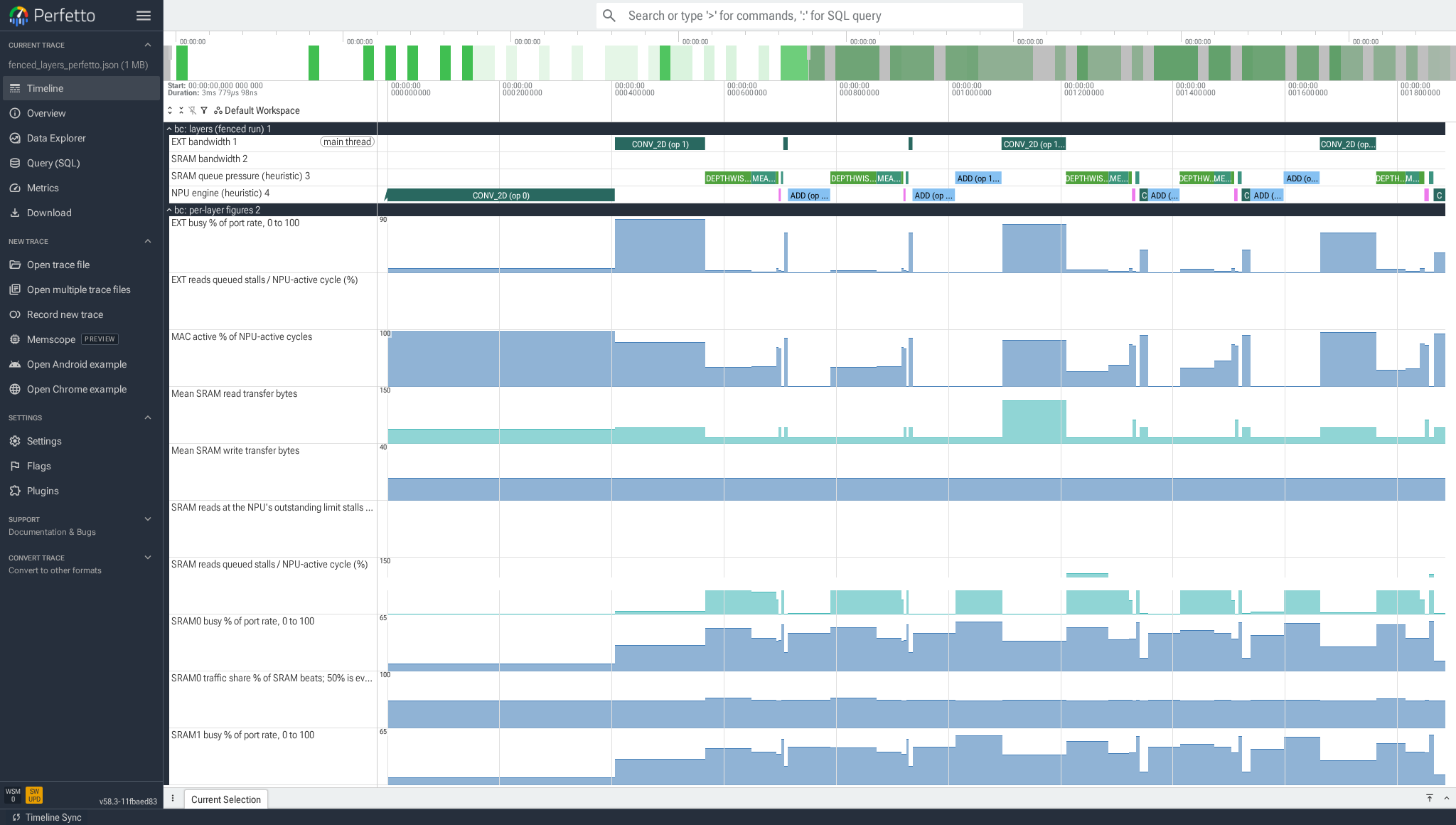
To generate this set of metrics for the public KWS model, copy
examples/at110/kws_bus_trace.yaml within its directory, give
run.results_dir a separate directory, add pmu_profile: port_stall under
defaults.fvp, and add per_layer: {mode: per_op} inside the model entry.
Run that config, then open its artifacts/fenced_layers_perfetto.json.
Use Expand all to reveal both groups and all their tracks. In each counter’s
Track options, choose Size → Medium (2x) for larger graphs, and drag
the label-column divider to leave more room for the timeline. Model timings
and operator counts will differ from the proxy screenshot.
The screenshot reuses a verified v0.8.0 simulation with the updated renderer;
these metric tracks are available from helx 0.9.0. Capture and model identities
are recorded in the source repository’s docs/images/README.md.
On the Ethos-U85, select defaults.fvp.pmu_profile: sram_stall to count SRAM
read/write queue cycles, read/write beats and MAC-active cycles together. The
complete example also enables per-operator fencing:
uv run --frozen helx run -c examples/at110/resnet_sram_stall.yamluv run --frozen helx show results/resnet_sram_stallmeasurements.samples[i].cycles.sram_wr_tran_req_stalled counts write address requests held while
the memory interface is not ready (AWVALID && !AWREADY); it does not count
write-data backpressure. sram_wr_stall_limit counts stalls from the NPU’s
outstanding-transaction limit. These are distinct events, not a count of
outstanding transactions or proof of the downstream queue depth.
The analogous sram_rd_* fields describe reads. Zero means counted zero;
an absent field means uncounted. The profile uses all eight event counters,
so EXT traffic and the complete measured energy estimate are unavailable.
Existing profiles remain available for other counter selections. U55/U65
default and default_ext_rd_stall also leave EXT write beats uncounted;
these runs cannot supply the complete counter-based energy estimate. A
previous parser substituted zero for that missing counter; new results
preserve it as unknown.
The fenced CSV and Perfetto timeline add SRAM writes queued and SRAM writes at the NPU’s outstanding limit. U85 SRAM stall events sum across AXI ports. The plotted ratio is the event count divided by NPU-active cycles, shown as a percentage; it can exceed 100% and is left unclipped. It is not the fraction of elapsed time a model stalled. Read and write events may overlap each other and useful NPU work: do not add them or interpret them as recoverable runtime. The SRAM queue pressure and NPU engine lanes are heuristics; missing counters do not establish an unconstrained memory path.
Open results/resnet_sram_stall/artifacts/fenced_layers_perfetto.json in
Perfetto, click Expand all, and select an invocation to see its original
operators, NPU-active cycles and traffic. Expand both layers (fenced run)
and per-layer figures; the read and write request-stall tracks are separate.
The screenshot uses the shipped ResNet example on helx 0.8.0.
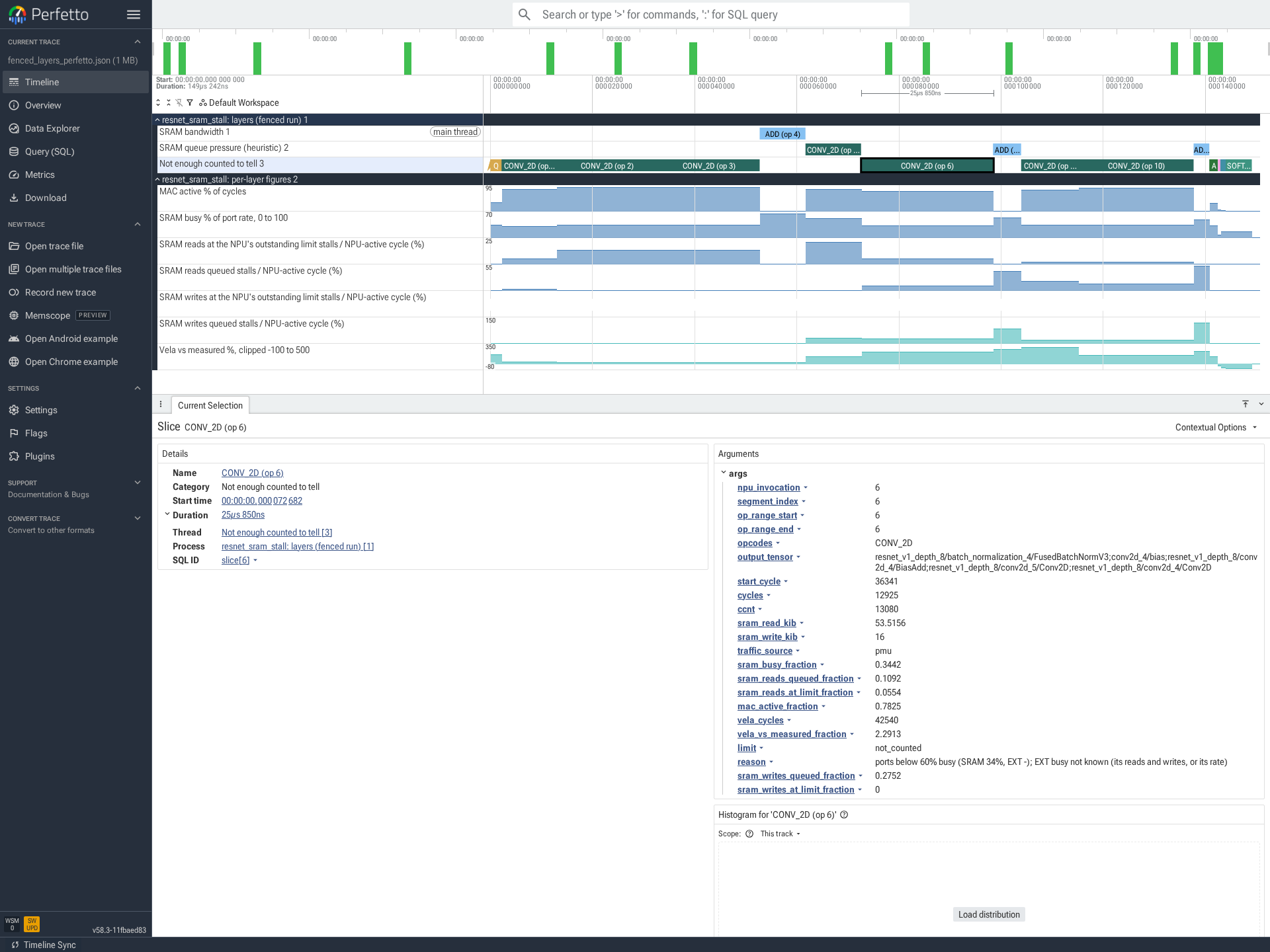
This profile does not count EXT traffic. Its absence in the details means unknown, rather than zero. A Not enough counted to tell lane is expected when the available counters cannot support a bottleneck classification.
Fencing changes scheduling and fusion. A percentage improvement in an
operator-isolated run is not the same improvement in the normal model.
Compare measurements.samples[i].cycles from matching unfenced runs for the model’s NPU work;
these counters exclude CPU operators and are not end-to-end application latency.
FVP total/CCNT values have simulator step granularity, so small differences
are model sensitivity, not a precise silicon speedup;
use per_segment artifacts to investigate the separate fenced experiment.
Counter definitions: Arm Ethos-U85 TRM, issue 05, PMU events.
Optional fenced layer timeline
Section titled “Optional fenced layer timeline”To collect counters between operations, use the existing
examples/what-if/corstone_300_u55/kws_per_op.yaml example after
helx setup --target corstone-300:
uv run --frozen helx run -c examples/what-if/corstone_300_u55/kws_per_op.yamlAlternatively, enable fencing on a copy of your own config. Set this inside
its model entry, alongside source and memory_placement:
per_layer: mode: per_opFenced profiling supports LiteRT, heliaRT and heliaAOT (1.3.0 or later). It inserts
ETHOS_U_STREAM_SPLIT boundaries, recompiles and reruns the model. Fences can change
fusion and scheduling; compare with the unfenced run explicitly.
Open the file recorded in per_segment.layers_perfetto_json (normally
artifacts/fenced_layers_perfetto.json) in Perfetto. Its time axis concatenates
fenced NPU-active intervals at the configured NPU clock; it omits CPU gaps and
is not application wall time. per_segment.layers_csv holds the segment table.
A segment is a fenced NPU invocation, not a guarantee of one original operation.
For additional stall diagnostics on U85 only, choose
defaults.fvp.pmu_profile: port_stall. On U55/U65, keep the example’s default
supported profile; port_stall is unavailable. That U85 profile does not count
write beats, so absent write metrics remain unknown. Bus tracing can accompany
it on U85, but is not required for the layer timeline.
In Perfetto, click Expand all in the track toolbar, or expand the chevrons beside layers (fenced run) and per-layer figures. The first group shows NPU invocation intervals; the second shows the retained diagnostic series. Click an invocation to inspect its duration and retained counter arguments.
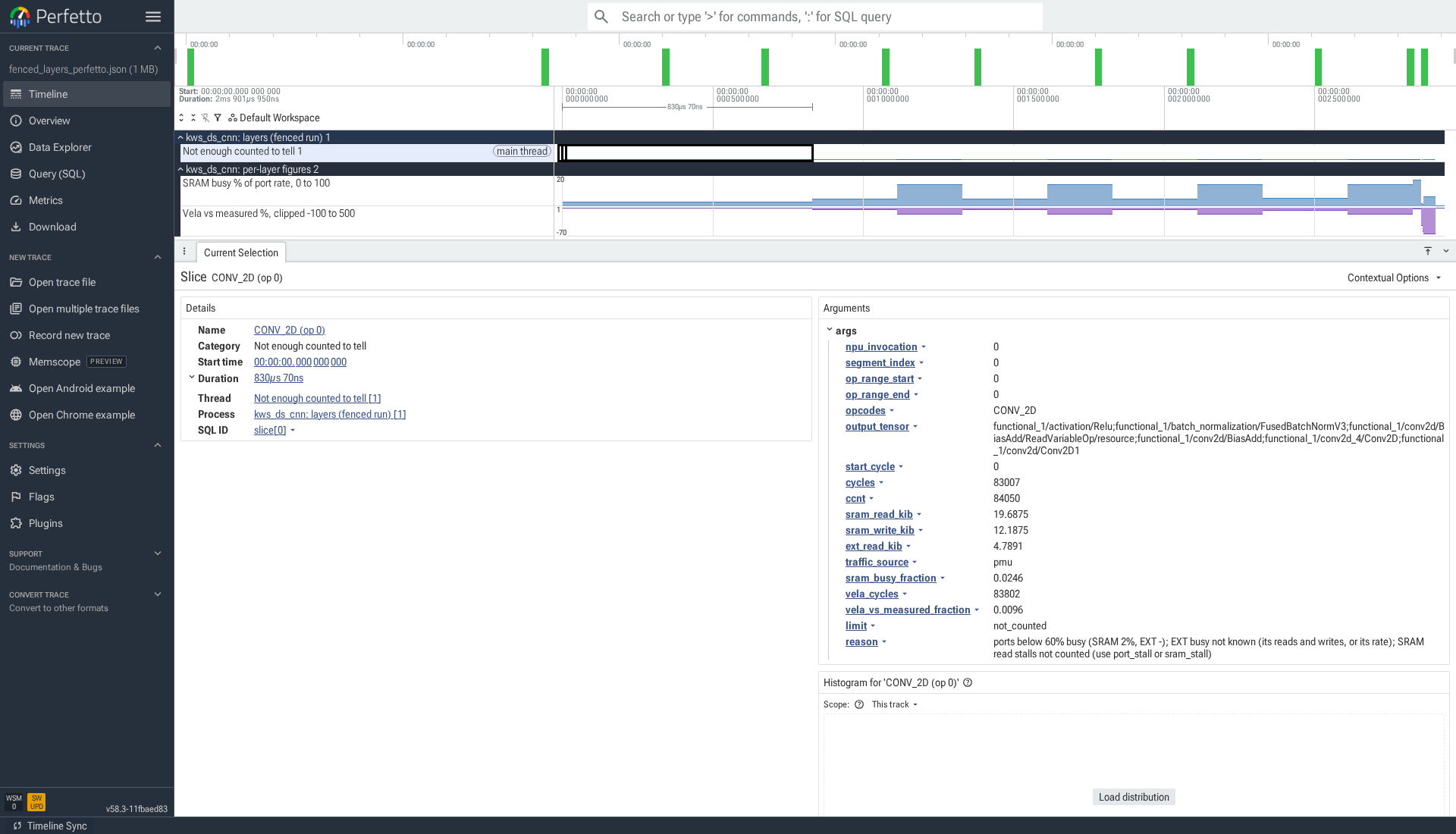
This U55 example does not collect every counter needed to classify a layer’s likely bottleneck. Its Not enough counted to tell lane preserves that limitation; it is not a simulation failure. This retained v0.8.0 image includes the former Vela comparison track; new traces use the measured and derived view illustrated above.
If a visualization file is absent, check the summary’s artifact references and
stage first: a compile-only run has no bus trace or fenced PMU timeline, and a
run without per_layer fencing has no fenced timeline. The overlay graph and
the fenced timeline answer different questions and need different inputs.
See Tensor inputs and numerical verification for fixed input bytes, per-sample output artifacts and explicit reference/tolerance policies.
SRAM transaction sizes
Section titled “SRAM transaction sizes”On U85, defaults.fvp.pmu_profile: sram_transactions counts accepted SRAM
read/write transactions with matching aggregate SRAM beats in the same capture:
uv run helx run -c examples/at110/resnet_sram_transactions.yamluv run helx show results/resnet_sram_transactionsThe eight slots contain NPU activity, MAC activity, all four SRAM/EXT beat totals, and SRAM read/write accepted transactions. The dedicated cycle counter remains available. This preserves the traffic inputs for energy estimation, but omits the default profile’s per-interface read splits and does not count queue stalls. Existing profiles and the default are unchanged.
Each native measurements.samples[i].traffic_transactions block has sram_rd
and sram_wr counts, in transactions. Zero is counted zero; null is
unavailable. The portable export retains these as namespaced transaction
observations and adds derived burst_average observations with source pointers.
For each direction, average beats per transaction is matching beats divided by accepted transactions; bytes per transaction multiplies by the platform’s bytes per beat. Ratios are unavailable when either count is missing, the transaction count is zero, or PMU overflow is nonzero or unknown. Byte ratios also require a known byte-aligned beat width. These are whole-window aggregate transfer averages, not a distribution of burst lengths, outstanding queue depth, or a prediction of performance gains. No counters from different profiles or invocations are combined.
The example also makes a separate per-operator fenced capture. Its segment CSV contains the raw transaction counts and matching beat/byte averages. Segment ratios use only that capture and are withheld if its totals do not reconcile. Fencing changes scheduling; do not combine those counters with the normal run.